
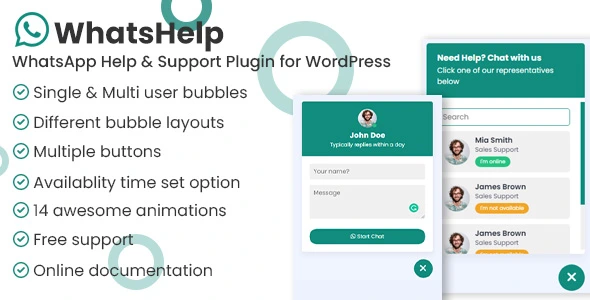
WhatsApp Chat Help WordPress
🔥 233 items sold
- Instant download after purchase
- Quality checked by Team Webgpl
- 100% Original Product and Virus Free
- Regular updates notifications
- Lifetime future free updates
- Use on unlimited websites
- 24/7 customer support
Description
WhatsApp Chat Help WordPress v3.1.4
In the modern digital era, fast and direct communication has become essential for online success. Website visitors expect instant responses, easy support options, and personalized interaction. The WhatsApp Chat Help WordPress Plugin is a powerful solution that allows website owners to add whatsapp chat support directly to their wordpress website, enabling real-time communication with visitors.
With WhatsApp being one of the most widely used messaging platforms globally, integrating WhatsApp chat into your website helps improve customer engagement, increase conversions, and build trust effortlessly.
What Is WhatsApp Chat Help WordPress Plugin?
WhatsApp Chat Help is a lightweight and easy-to-use WhatsApp chat plugin for WordPress that displays a chat button on your website. When visitors click the button, they are instantly redirected to WhatsApp (mobile app or WhatsApp Web) to start a conversation with your support team or business owner.
This plugin eliminates the need for complex live chat systems and allows users to communicate using an app they already trust and use daily.
Key Features of WhatsApp Chat Help WordPress Plugin:
Easy Installation and Setup
The plugin can be installed and configured within minutes. No coding knowledge is required. Simply add your WhatsApp number, customize the message, and activate the chat button.
Customizable WhatsApp Chat Button
The plugin offers full design flexibility. You can:
-
Choose button position (left or right)
-
Customize colors and styles
-
Add text or icons
-
Match the button with your website branding
This ensures a seamless and professional user experience.
Pre-Filled Automatic Messages
With the automatic message pre-fill feature, users see a predefined message when they open WhatsApp.
Example:
“Hello, I’m interested in your services.”
This saves time and improves conversation clarity.
Offline Message Support
Even when you are unavailable, WhatsApp Chat Help ensures customers can still contact you. Offline messages allow visitors to leave queries, ensuring no lead or support request is missed.
Mobile & Desktop Compatibility
The plugin works flawlessly on all devices. On mobile, it opens the WhatsApp app directly, while on desktop it redirects users to WhatsApp Web.
Fast & Lightweight Performance
WhatsApp Chat Help is optimized for speed and performance. It does not affect page load time or Core Web Vitals, which is crucial for SEO rankings.
Benefits of Using WhatsApp Chat Support on WordPress:
Improve Customer Support Instantly
WhatsApp enables real-time communication, allowing businesses to resolve queries faster and more efficiently than emails or contact forms.
Increase Sales and Conversions
When users can ask questions instantly, hesitation decreases. This results in higher conversion rates, especially for eCommerce and service-based websites.
Build Trust and Credibility
WhatsApp chat creates a personal and friendly communication channel, helping businesses establish trust with potential customers.
Better User Experience
Unlike traditional support systems, WhatsApp chat feels natural and convenient. Users don’t need to create accounts or wait for replies.
SEO Engagement Benefits
Although WhatsApp chat is not a direct ranking factor, it improves dwell time, engagement, and bounce rate, which positively impact SEO performance.
Ideal Use Cases for WhatsApp Chat Help Plugin:
The WhatsApp Chat Help WordPress Plugin is perfect for:
-
E-commerce stores – product inquiries and order support
-
Service providers – instant consultations
-
Freelancers & agencies – lead generation
-
Educational websites – student support
-
Real estate businesses – quick property inquiries
No matter your industry, WhatsApp chat support enhances communication and conversions.
Why Choose WhatsApp Chat Help Over Other Live Chat Plugins?
Traditional live chat plugins often require agents to stay online continuously and may slow down websites. WhatsApp Chat Help offers a simpler alternative:
-
No learning curve for users
-
Chats are saved in WhatsApp
-
Respond anytime, anywhere
-
Trusted global platform
This makes it a more reliable and user-friendly solution compared to standard live chat systems.
SEO-Friendly, Conversion-Focused & Easy to Use
The WhatsApp Chat Help WordPress Plugin is designed with both SEO and user experience in mind. It is lightweight, mobile-friendly, customizable, and conversion-focused, making it an essential plugin for modern WordPress websites.
Adding WhatsApp chat support to your website is no longer optional—it’s a necessity. The WhatsApp Chat Help WordPress Plugin allows you to connect with visitors instantly, provide better customer support, and boost sales without complexity.
If you want to improve engagement, increase conversions, and offer seamless communication, WhatsApp Chat Help is the perfect WordPress solution for your business.
Frequently Asked Questions (FAQ)
Is WhatsApp Chat Help plugin free?
Yes, it offers a free version with essential features. Premium versions may include advanced customization options.
Does it work on mobile devices?
Yes, it works perfectly on both mobile and desktop devices.
Will the plugin slow down my website?
No, it is lightweight and optimized for fast performance.
Can I customize the WhatsApp chat button?
Yes, you can customize colors, position, text, and style easily.
Tags – chat WhatsApp, click to chat, contact, customer support, support, whatsapp, whatsapp business, whatsapp button, whatsapp chat, whatsapp click to chat, WhatsApp elementor, whatsapp shortcode, wp whatsapp chat
Current Version – 3.1.4
| Last Update | |
| Gutenberg Optimized | Yes |
| High Resolution | Yes |
| Compatible Browsers | IE7, IE8, IE9, IE10, IE11, Firefox, Safari, Opera, Chrome, Edge |
| Compatible With | Block Editor, Elementor, Elementor Pro, Visual Composer, WPBakery Page Builder |
| Files Included | JavaScript JS, CSS, Sass, PHP |
| Software Version | WordPress 6.8.x, WordPress 6.7.x, WordPress 6.6.x, WordPress 6.5.x, WordPress 6.4.x, WordPress 6.3.x, WordPress 6.2.x, WordPress 6.1.x, WordPress 6.0.x, WordPress 5.9.x, WordPress 5.8.x, WordPress 5.7.x, WordPress 5.6.x, WordPress 5.5.x, WordPress 5.4.x, WordPress 5.3.x, WordPress 5.2.x, WordPress 5.1.x, WordPress 5.0.x, WordPress 4.9.x |
Why Choose GPL Downloads:
1. Legal and Ethical Integrity:
Selecting GPL (General Public License) downloads ensures legal compliance, allowing you to use, modify, and distribute themes while upholding ethical standards and copyright laws.
2. Community Support:
Enjoy the advantages of a robust developer community surrounding GPL-licensed plugins. Tap into forums, discussions, and collective expertise for valuable assistance in troubleshooting and advice.
3. Customization Freedom:
With GPL, seize the liberty to tailor wordpress plugins to your precise specifications. Modify code, integrate features, and adapt designs without encroaching upon licensing boundaries, enabling a truly personalized experience.
4. Respect for Developers:
Opting for GPL downloads demonstrates appreciation for developers’ dedication and talent. By choosing GPL, you contribute to a sustainable ecosystem that rewards developers for their innovative contributions, fostering a culture of respect and support.
Plugin Features:
- Single agent support – This option will allow you to add a bubble with a single WhatsApp number for receiving messages/calls from the single agent.
- Multiple agents support – This option will allow you to add unlimited agents. So visitors can choose the option which they want to chat.
- Different whatsapp buttons – We provide a set of buttons to use anywhere on your website and all functionalities also can be set with each button.
- Exclude/include option – Exclude/include options for showing or hiding WhatsApp chat bubbles on specific pages
- Availability time – You will have available time for a single agent, multi-agents, and for the buttons.
- Set timezone – You will able to set your timezone so your time will work based on your time otherwise it will work from the user’s computer’s time.
- Let your audience know you’re offline – Based on your available time it will show you offline when you are not available
- GDPR compliance – You have the option to show GDPR compliance checkbox so user we will not able to chat with you till they agree
- Floating bubble animations – We have lots of animations to show the button UI awesomely.
- Device specific view – The plugin has an easy option for showing the plugin only for desktops, only for mobile, and only for tablets.
- Easy to customize – The plugin is include a proper documentation. The main file only has some js, CSS, and HTML code. So you will able to customize it easily. If it looks complex, never hesitate to ask us to install it free of cost.
- Well documentation – We tried to make the documentation as clear as possible. We hope you will able to manage it without any coding experience.
Related products

Follow My Blog Post – WordPress / WooCommerce Plugin

BEAR – WooCommerce Bulk Edit and Products Manager Professional – Products bulk edit
AIKit – WordPress AI Automatic Writer, Chatbot, Writing Assistant & Content Repurposer / OpenAI GPT


FileBird – WordPress Media Library Folders Plugin
Recently viewed items
Reviews
There are no reviews yet.