


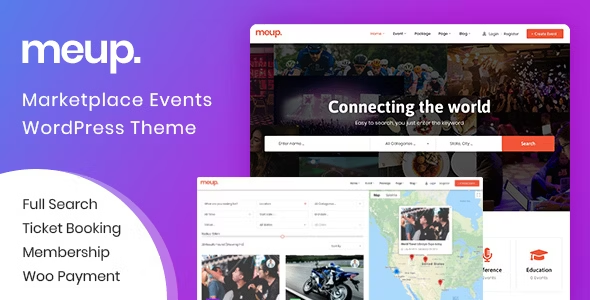
Meup – Event Marketplace WordPress Theme
🔥 191 items sold
- Instant download after purchase
- Quality checked by Team Webgpl
- 100% Original Product and Virus Free
- Regular updates notifications
- Lifetime future free updates
- Use on unlimited websites
- 24/7 customer support
Description
Meup – Event Marketplace WordPress Theme v2.2.1
Meup is a powerful and modern Event Marketplace & Directory Listing WordPress Theme designed to help you create, manage, and monetize a local or global event platform with ease. Whether you are planning to build an events directory, ticket booking website, or a full-featured event marketplace, Meup provides all the tools you need in one flexible and user-friendly solution.
Unlike traditional event templates, Meup works as a multi-vendor event marketplace, allowing vendors and organizers to submit, manage, and promote their own events directly on your website. This makes it an ideal choice for entrepreneurs who want to generate revenue by charging vendors for event submissions, ticket sales, or featured listings.
The theme is suitable for a wide range of event types including concerts, conferences, workshops, business events, sports events, exhibitions, festivals, meetups, and online webinars. Meup supports both physical and virtual events, making it future-ready and perfect for hybrid event platforms.
One of the standout features of Meup is its QR Code Ticket Scanning App support. This feature helps organizers verify tickets instantly by scanning QR codes at entry points, reducing long queues and eliminating the stress of manual registration. It ensures faster check-ins, better crowd management, and a more professional event experience.
Meup allows you to sell event tickets online directly through your website. With seamless booking functionality, users can browse events, select tickets, make payments, and receive digital tickets instantly. The theme is fully compatible with popular WordPress plugins, ensuring smooth payment processing and advanced customization options.
From a design perspective, Meup is fully responsive, SEO-optimized, and performance-focused, ensuring your website loads fast and ranks well on search engines. The clean and modern UI offers a smooth user experience across all devices, including desktops, tablets, and mobiles.
Additionally, Meup is perfect for businesses, agencies, startups, and individuals who want to build an event listing website, ticket booking platform, or event management system without coding knowledge. With easy customization, powerful admin controls, and monetization options, Meup is a complete solution for event-based businesses.
If you’re looking for a scalable, feature-rich, and monetization-ready WordPress event marketplace theme, Meup is the perfect choice to turn your event idea into a profitable online platform.
Tags – booking, booking event, booking system, directory, event, event marketplace system, event theme, event wordpress theme, events, listing, marketplace, multi vendor marketplace, multiple vendor, online ticket, tickets
Current Version – 2.2.1
| Last Update | |
| Gutenberg Optimized | No |
| High Resolution | Yes |
| Widget Ready | Yes |
| Compatible Browsers | IE11, Firefox, Safari, Opera, Chrome, Edge |
| Compatible With | Contact Form 7, Elementor, WooCommerce 10.x.x, WooCommerce 9.x.x, WooCommerce 8.x.x, WooCommerce 7.x.x, WooCommerce 6.x.x, Bootstrap 4.x |
| Software Version | WordPress 7.0.x, WordPress 6.9.x, WordPress 6.8.x, WordPress 6.7.x, WordPress 6.6.x, WordPress 6.5.x, WordPress 6.4.x, WordPress 6.3.x, WordPress 6.2.x, WordPress 6.1.x, WordPress 6.0.x, WordPress 5.9.x, WordPress 5.8.x, WordPress 5.7.x, WordPress 5.6.x, WordPress 5.5.x, WordPress 5.4.x, WordPress 5.3.x, WordPress 5.2.x |
Why Choose GPL Downloads:
1. Legal and Ethical Integrity:
Selecting GPL (General Public License) downloads ensures legal compliance, allowing you to use, modify, and distribute themes while upholding ethical standards and copyright laws.
2. Community Support:
Enjoy the advantages of a robust developer community surrounding GPL-licensed themes. Tap into forums, discussions, and collective expertise for valuable assistance in troubleshooting and advice.
3. Customization Freedom:
With GPL, seize the liberty to tailor themes to your precise specifications. Modify code, integrate features, and adapt designs without encroaching upon licensing boundaries, enabling a truly personalized experience.
4. Respect for Developers:
Opting for GPL downloads demonstrates appreciation for developers’ dedication and talent. By choosing GPL, you contribute to a sustainable ecosystem that rewards developers for their innovative contributions, fostering a culture of respect and support.
Theme Overview:
How to make money with Meup Theme ?
SaaS in the event industry. If you want your event website to make profits from selling online tickets of other event organizer. The theme setup some method for earning:
- System Fee: Customers pay a small fee to the site owner for per transaction successful.
- Package Fee: The vendor (event organizers) pay fee for registering package, so the vendor can submit event and use many other features.
- Commission: The vendor (event organizer) have to pay percent sales for per transaction successful.
- Advertisement: The vendor (event organizers) pay manually fee to display their event like Featured.
Search Feature
Search tool is a crucial one that Meup provides to allow customers to filter events according to their own need. The theme supplies 3 search forms:
- Quick Search Form with 3 custom Fields. Ex: Event Name, Category, Location… depend on your need.
- Advanced Search Form with various fields: Event Name, Category, Location, Venue, Price, Object, Event Duration, Start Date and End Date.
- Ajax search: The result can display with Google Map
Support both virtual and physical events
– With online events: vendors will provide links and passwords so that clients can log in online events on webinars (Zoom, Google Meeting).
– With offline events: vendors can set up No Seat or Seat Code List or Seat Map that lets customers choose their seats.
Manage Package
If the vendor want to submit an event, they have to register a package. You also can setup a default package for new vendor account.
– The Site Owner: Setup many package with many options: Register Fee, Package Time, Event total, Fee per paid ticket, list/export attendees, list/export tickets, change tax per event.
– The Vendor (event organizers): Choose a package to register and payment.
Manage Category
– The Site Owner can create Unlimited Category.
– The Vendor (event organizers): Choose a category when create new event.
Manage Venue
– The Site Owner: Create Unlimited Venues.
– The Vendor (event organizers): Choose available venues or create new venue.
Manage Location
– The Site Owner: Create 2 level for location: State, City. You can translate State, City to other text to fit your purpose.
– The Vendor (event organizers): Choose State, City when create new event.
Create an Event Professional
The Site Owner or Vendor can create an event with many feature:
- Basic information: Name, Category, Tags and Description, State, City, Venue, Google Map, Image, Gallery, Video, Contact Info.
- Unlimited Ticket: Directly Ticket, Affiliate ticket. You can setup sell ticket with Seat Code or Seat Map, so the system will be suitable for many business lines.
- Calendar: Setup Individually or Recurring Event.
- Coupon: Setup Coupon for per Ticket Type.
- Staff: Set up staff to check in tickets at the door.
- Cancel Booking: Setup allow customer can cancel tickets.
- Tax: For these special event, the vendor can setup Percent of Tax.
- Extra Services: The vendor can sell other services with per ticket.
Manage My Bookings
The customer when book an event successfully, they can manage their booking. The customer make some action: Download PDF Tickets, Send Tickets to Mail, Download Invoice, Cancel Booking.
Manage Wallet
The Vendor (event organizers) can check balance, check profit, withdraw money about bank, check payout history, choose payout method.
Manage Sales, Tickets, Attenders
- The Vendor (event organisers): Check info of any event.
- General Information: Total before tax, Total after tax, Profit, Tax, Total Coupon used, Total Bookings, Total Tickets, Total Check-in after the event took place.
- Report Sales: Check Sales anytime.
- Remaining Tickets: Select a special date to check also change remaining ticket.
- Manage Attenders: List/Export the all customers.
- Manage Tickets: List/Export the all tickets( info of customers and Qr Code …), so you can use it for many purpose.
- Download Tickets: The Vendor can download all PDF Tickets in dashboard.
- Create Tickets: The Vendor can create PDF Tickets in dashboard.
- Send Tickets: The Vendor can send PDF Tickets to customers.
- The Site Owner:
- Check info of any event like an vendor.
- Check Commission of any event.
- Check Sales of website anytime.
- Change the event date and send mail to customers about changing.
- Admin Approve an user become Vendor.
- The Customer:
- The customer can transfer ticket for another client.
- Download, Cancel Booking.
Multiple Payment Gateway
You can use any payment gateway that supports PayPal, Stripe, WooCommerce plugin.
PDF Invoice
Allow Send Invoice to customer when buy the tickets successful.
Check in attendees easily
The vendor can check attendees by using 2 methods:
- Check-in directly on the website: Vendors can easily find out information about any tickets when they enter several characters of the QR Code on tickets in search form.
- Check-in via App: The vendor can install app in phone and use it to scan QR Code in Ticket. The App is Free and available in theme.
Automatic Email Notifications
with Meup – Event Marketplace WordPress Theme, the system create many mail template.
- Confirmation Email: After booking successful, an automatic email will be sent to customers email addresses, including information of orders, PDF Tickets, QR Code, PDF Invoice.
- Reminder Email: Some days before the event takes place, Customers will receive a Reminder Email.
Custom Checkout Field
If you want to add many fields to booking form to fit your business, the theme is ready for this. The theme supports many input type: Text, Password, Phone, Email, Textarea, Radio, Checkbox, File.
Unlimited Custom Taxonomy
If you want to add many fields for event, you can use custom taxonomy. You can use these custom taxonomy to filter data in search form.
RTL Supports
The theme supports RTL, so you can use Arabic language for your site.
Event Calendar
When visitors look at the calendar, they will know the date the event takes place, so they can choose the suitable date. You can display the calendar according to days, weeks, months and list.
Header Footer Elementor
You can build Header/Footer template with your imagination.
Other Features
- Create Manual Booking: This is crucial when the admins want to add orders that customers book directly or via phone.
- Add/Update Membership: Support add or change info when user register membership.
- Cancel/Refund Booking: Customers can cancel their bookings when those bookings meet the requirement of Booking Cancellation Policy.
- Manage payout:: Manage payout history.
- Sales Report for admin: Sales reports according to year, month, time period.
- User Report for admin: The number of registered users according to year, month, time period
- Customize Theme: Support many hooks and easily customize the template in the child theme.
- Full Elements: Support full elements of elementor.
Global Features
- Free all plugins: You don’t need to buy any plugins. After installing, your site will be like our demo
- One click demo content
- Update Theme Lifetime
- GTMetrix: 96 Points
- Build content with Elementor Page Builder
- Build Header/Footer with Elementor Page Builder
- Multiples Custom Elements for Page Builder
- Live Customize
- Change Typography easily in Customize
- Unlimited Color
- Wide & Boxed Layout
- Blog with Left/Right/No Sidebar
- Contact Form 7
- Multiple Font Icons Included
- Google Fonts
- Allow to use Custom Fonts
- SEO Optimized
- Browser compatible
- Speed Performance
- 1170px Grid System
- Support Monday to Friday
- Documentation Step by Step
Related products

R&F – Roof & Floor WordPress Theme 1.0
Total – Responsive Multi-Purpose WordPress Theme

TheFox | Responsive Multi-Purpose WordPress Theme

Ronby – 6 Niche Business Multi-Purpose WordPress Theme 6.1.6

Cariera – Job Board WordPress Theme
Recently viewed items

Reviews
There are no reviews yet.